Features

Everything the panel does, in the order you meet it.

One binary, one database, one screen per job. Below is every module of the panel with a real screen of it.
Workloads

A stack is a service.

  • Stacks from a compose file, a docker run line or a form.
  • Every stack runs as a service in the workload pool: replicas come back on their own, updates roll one replica at a time.
  • Two probes. Health asks whether the app is alive, and replaces the replica if not; Readiness asks whether it is ready for visitors, and until it passes there is no traffic and the stack shows Progressing.
  • Namespaces keep staging away from production; secrets, configs and placement live inside one.
  • Jobs and cron jobs, exec or container, with output and exit code kept.
  • Version history and one-click rollback on every plan.
panel.example.com
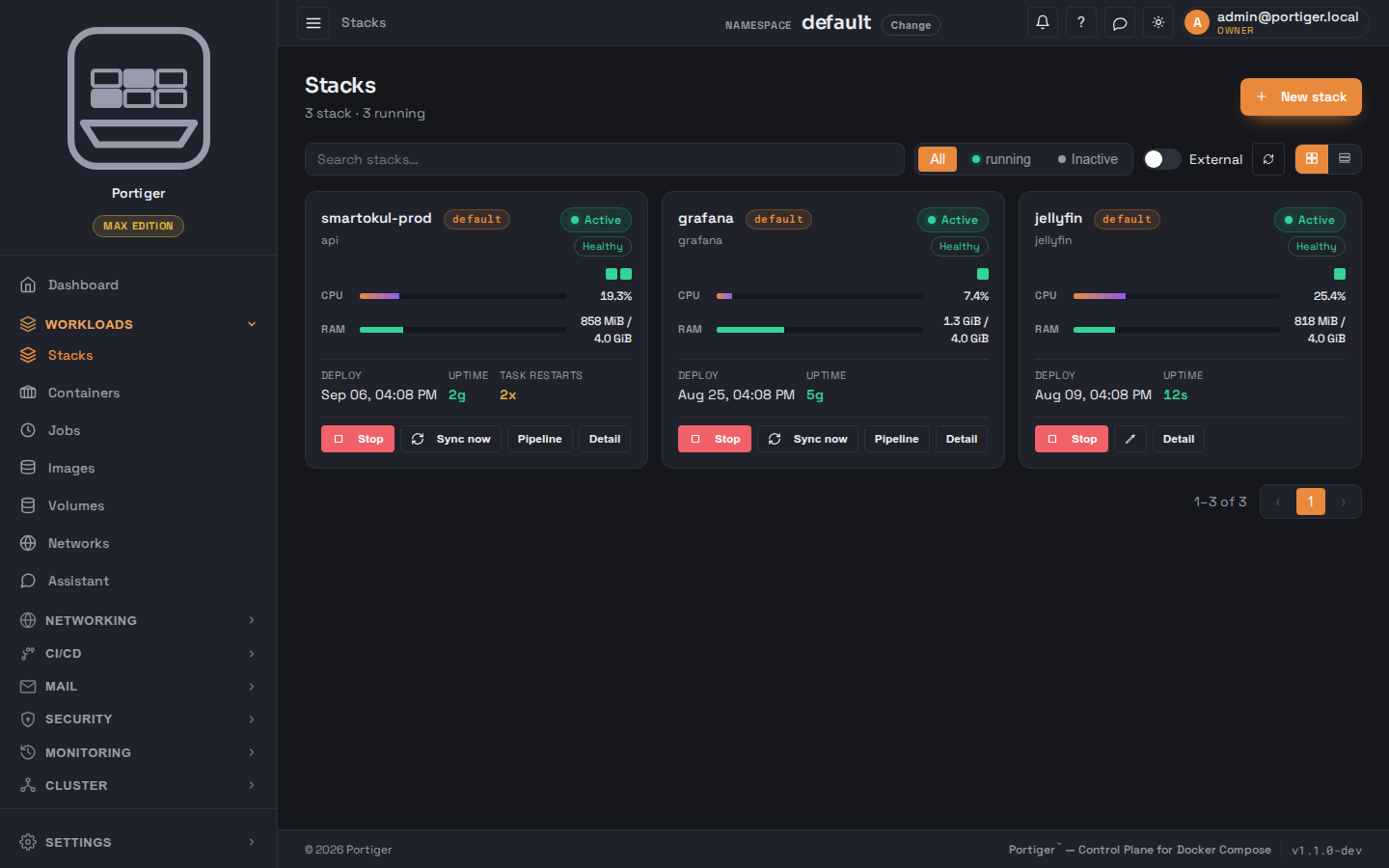
The Stacks page: three stacks as cards, each with its namespace, health, processor and memory use, deploy time and uptime.
Networking

A domain is one object.

  • DNS points the name here, Web says which stack answers.
  • DNS providers with DNS-01 and wildcard certificates, and a zone editor.
  • Certificates issued and renewed by the panel.
  • Rules on the domain: redirect to HTTPS, path strip, basic auth, rate limit, IP allow list, headers, CORS, compression.
  • Sticky sessions and health-aware routing per domain.
  • Publishing defaults for every new domain.
panel.example.com
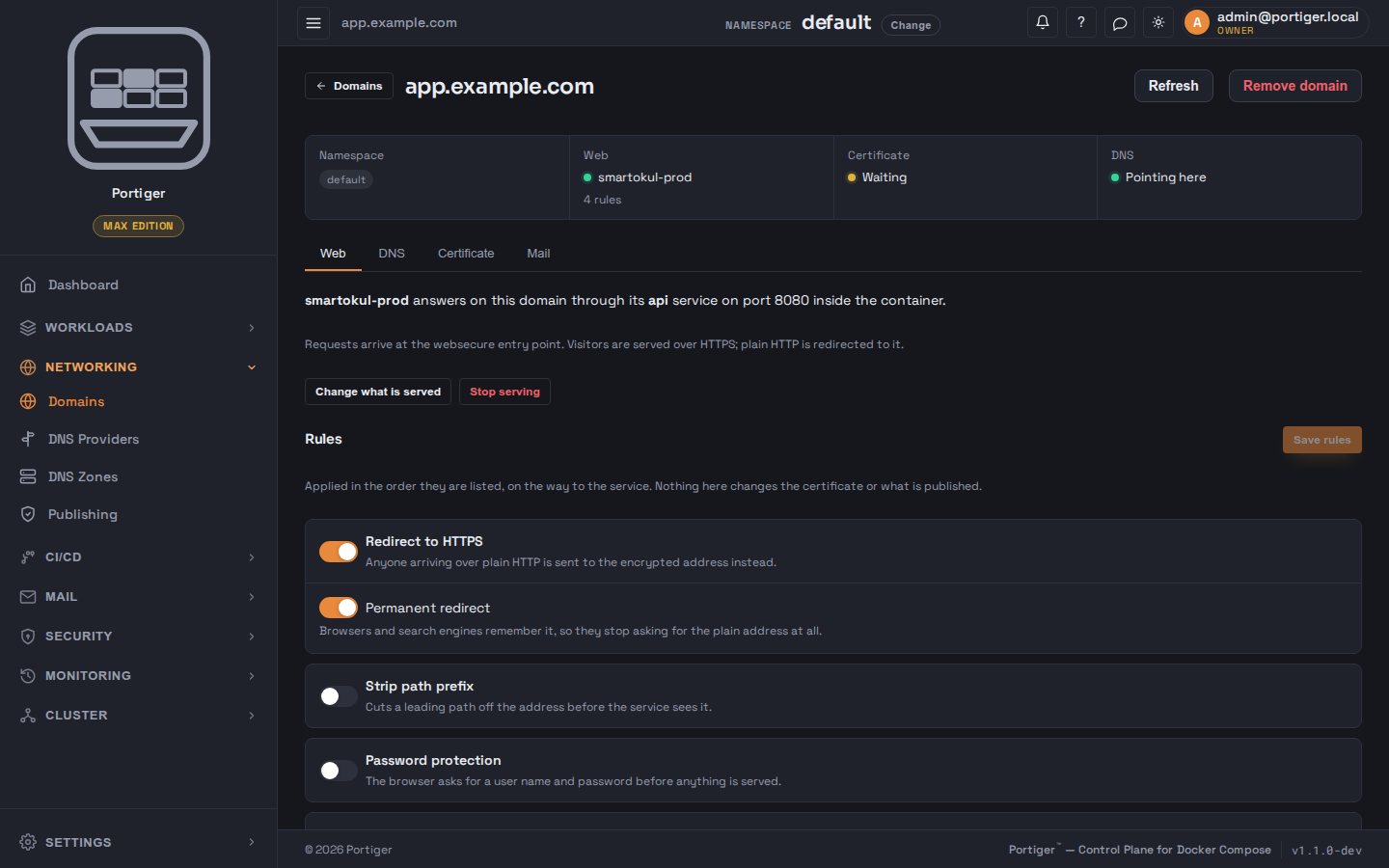
A domain's Web tab: which stack and port answer on it, and switches for redirect to HTTPS, permanent redirect, stripping a path prefix and password protection.
CI/CD

Your runner builds. Portiger checks and deploys.

  • GitHub, GitLab, Gitea or Bitbucket.
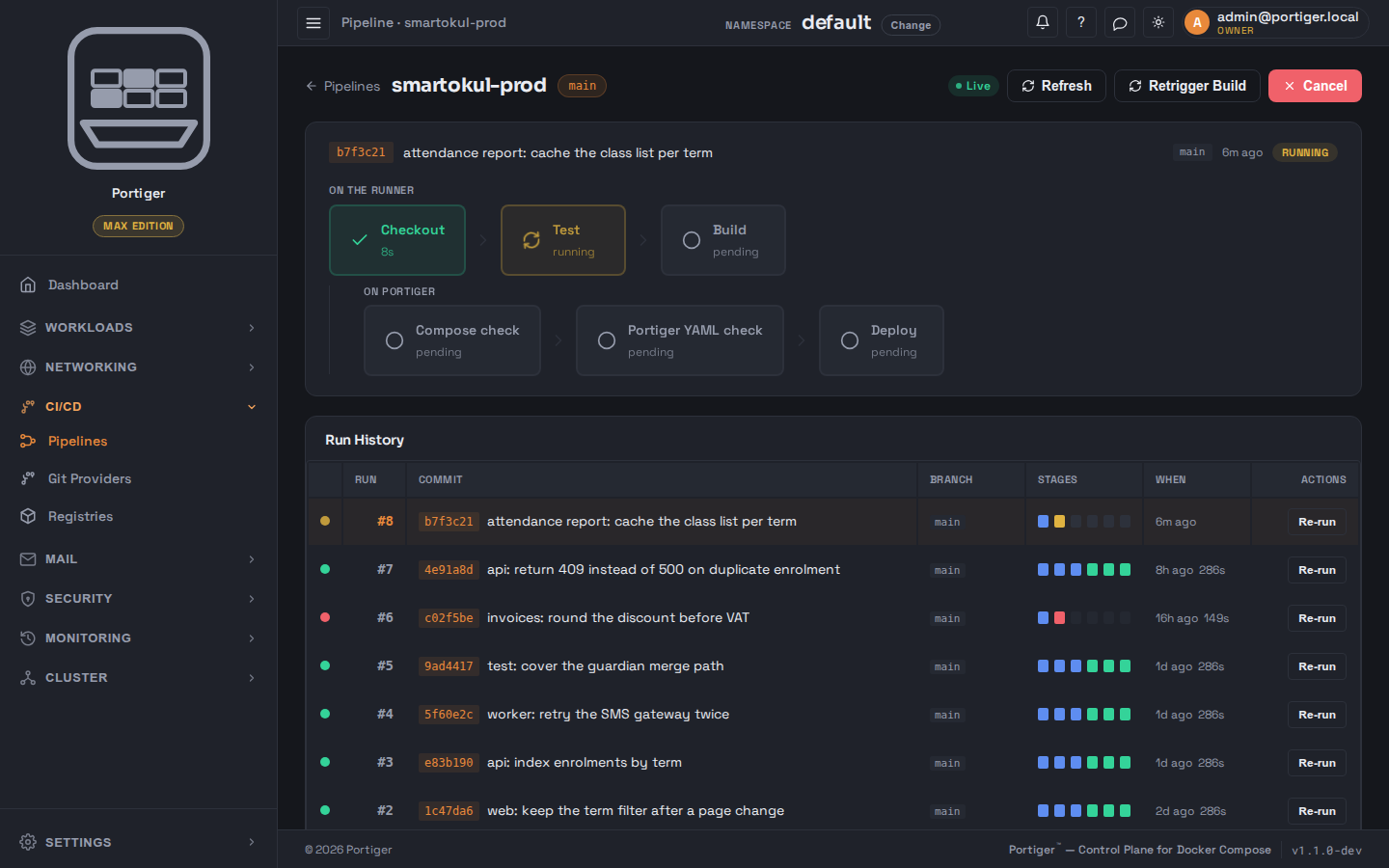
  • Six stages: Checkout, Test and Build on the provider's runner; Compose check, YAML check and Deploy on Portiger.
  • A deploy gate when you want to approve first.
  • Branch to namespace mapping: main to production, develop to staging.
  • Private registries.
  • Re-run any stage from the run history.
panel.example.com
A pipeline run: checkout done, tests running and build pending on the runner, then the compose check, the portiger.yaml check and the deploy waiting on Portiger, with the earlier runs listed below.
Mail

A mail server on your own domain.

  • Turned on for a domain you already registered in Networking.
  • Mailboxes, forwarders, lists and auto-replies.
  • The DNS records (MX, SPF, DKIM, DMARC) written for you.
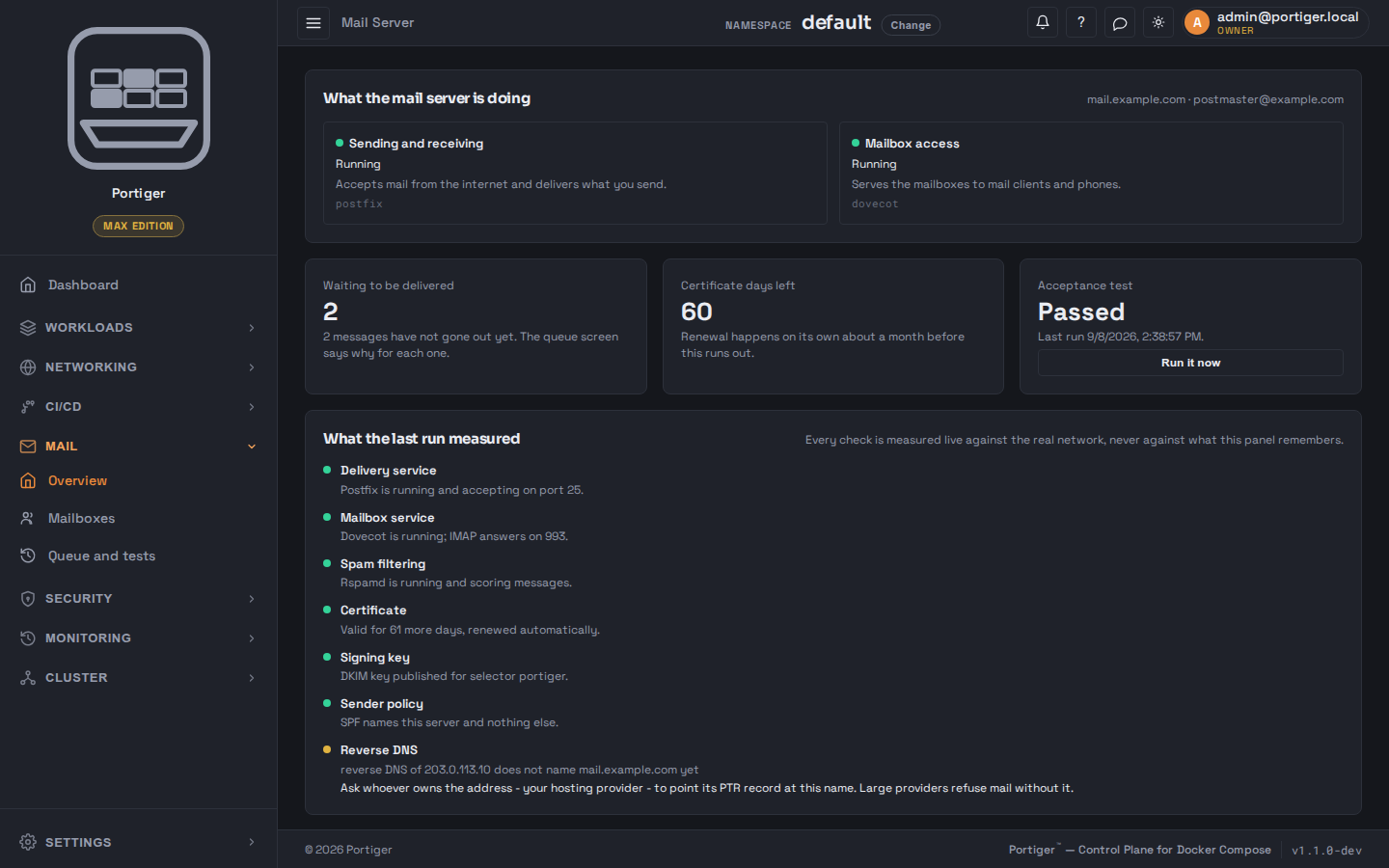
  • An acceptance test that measures the real network.
  • One click makes it the panel's own SMTP.
  • Client settings per mailbox for Thunderbird, Outlook and phones.
panel.example.com
The mail server overview: sending, receiving and mailbox access running, the queue and certificate days left, and the last acceptance test with a finding about reverse DNS.
Security

Secrets, posture, identity, mesh.

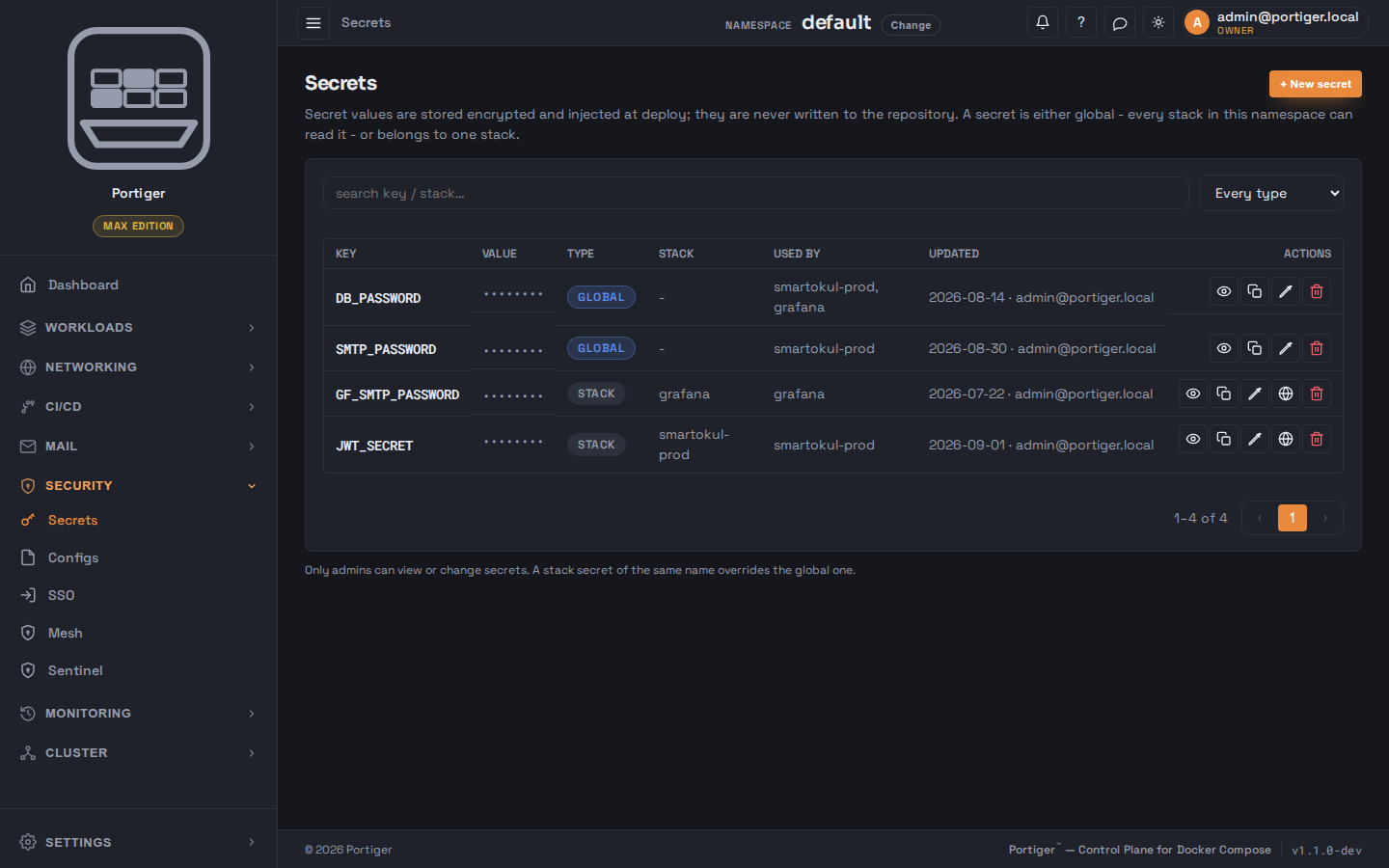
  • A secret vault with global and per-stack scope; a stack secret can be made global.
  • Sentinel reads the host it runs on, thirteen checks, no scanner and no vulnerability database, one fix per finding.
  • Single sign-on through your identity provider.
  • An mTLS mesh between services on Max.
  • Configs with a rollout question before every save.
panel.example.com
The Secrets page: four keys with their values masked, each marked global or belonging to one stack, with the stacks that use them and when they were last changed.
Monitoring

What is running, what changed, who to tell.

  • CPU, memory and HTTP metrics per stack and per container.
  • History of what changed, who changed it and how it looked before.
  • Notifications by SMTP on every plan; Discord, Slack, Telegram, Teams and webhooks from Team.
  • Retention of three days, seven days or unlimited, by plan.
panel.example.com
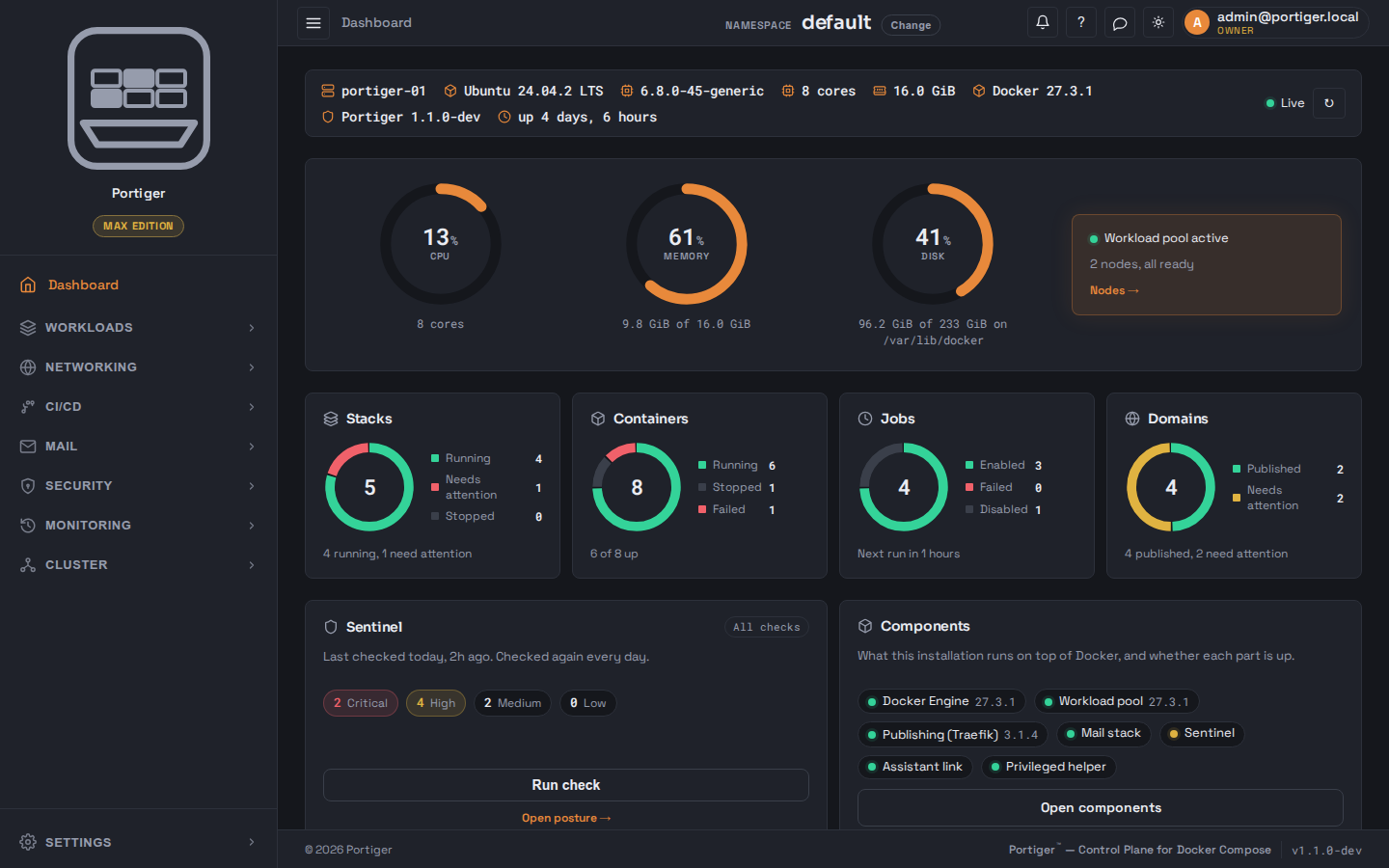
The Portiger dashboard: processor, memory and disk gauges for the machine, counts for stacks, containers, jobs and domains, and cards for Sentinel and the system components.
Cluster

Nodes over SSH. Copies and placement per stack.

  • This node first; add a node by giving the panel SSH access once.
  • The panel installs Portiger there and joins it to the pool.
  • Copies fixed or automatic between a minimum and a maximum with CPU thresholds.
  • Placement left to the pool or pinned to one node.
  • Three nodes on Max.
panel.example.com
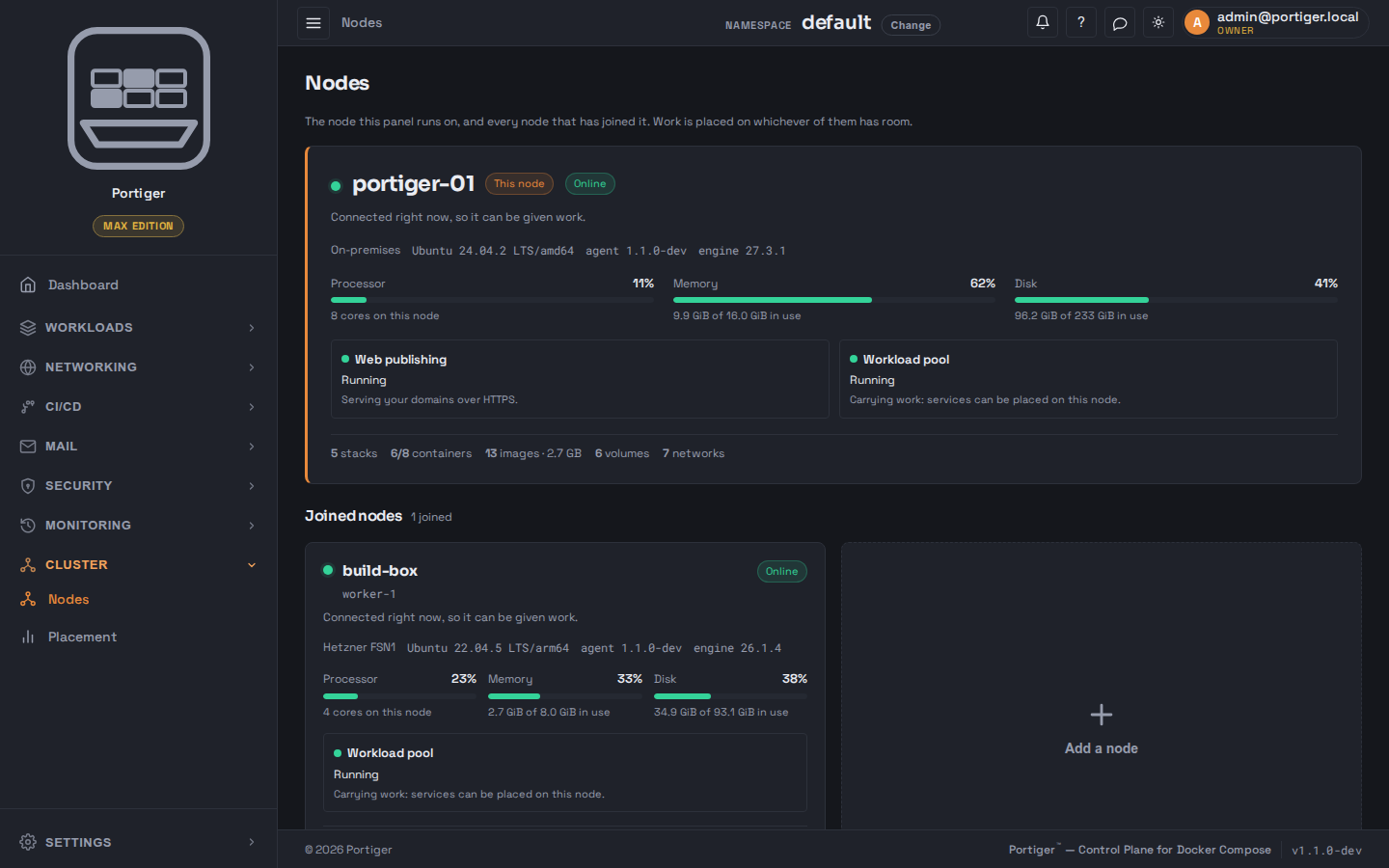
The Nodes page: the machine the panel runs on with its processor, memory and disk in use, one joined node below it, and a card for adding another.
panel.example.com
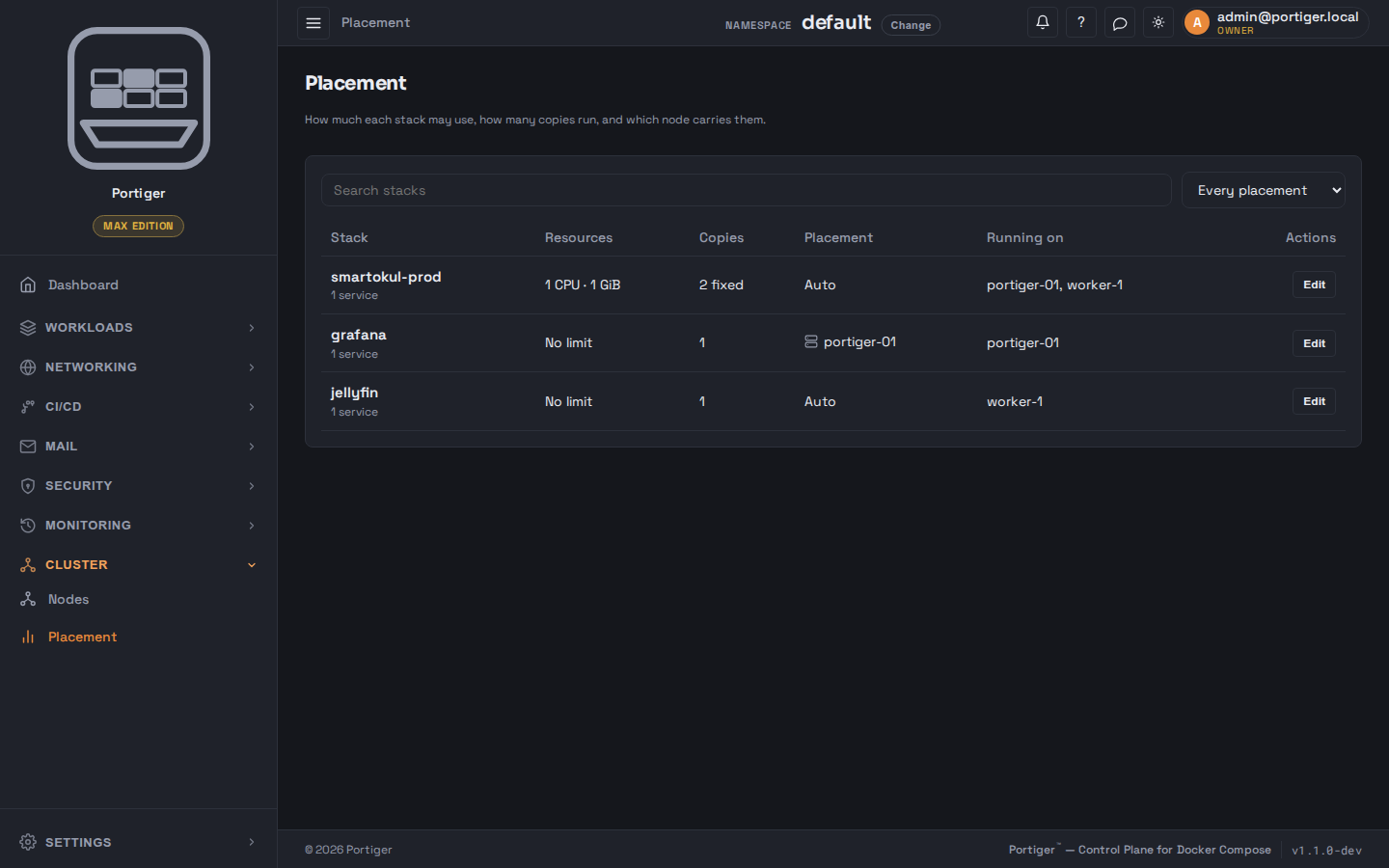
The Placement page: each stack with the resources it may use, how many copies run, whether placement is automatic or pinned, and which node is carrying it.
Assistant

Say what you want. Approve the plan.

  • Ask how the panel works; answers link to the page.
  • Describe an application; it analyses, reads your installation and plans with a security review.
  • You approve the plan and the stack name; it may touch nothing else.
  • Deploys with a fix loop and hands you the stack.
  • Linked to Portiger's service with a token; Max plan.
panel.example.com
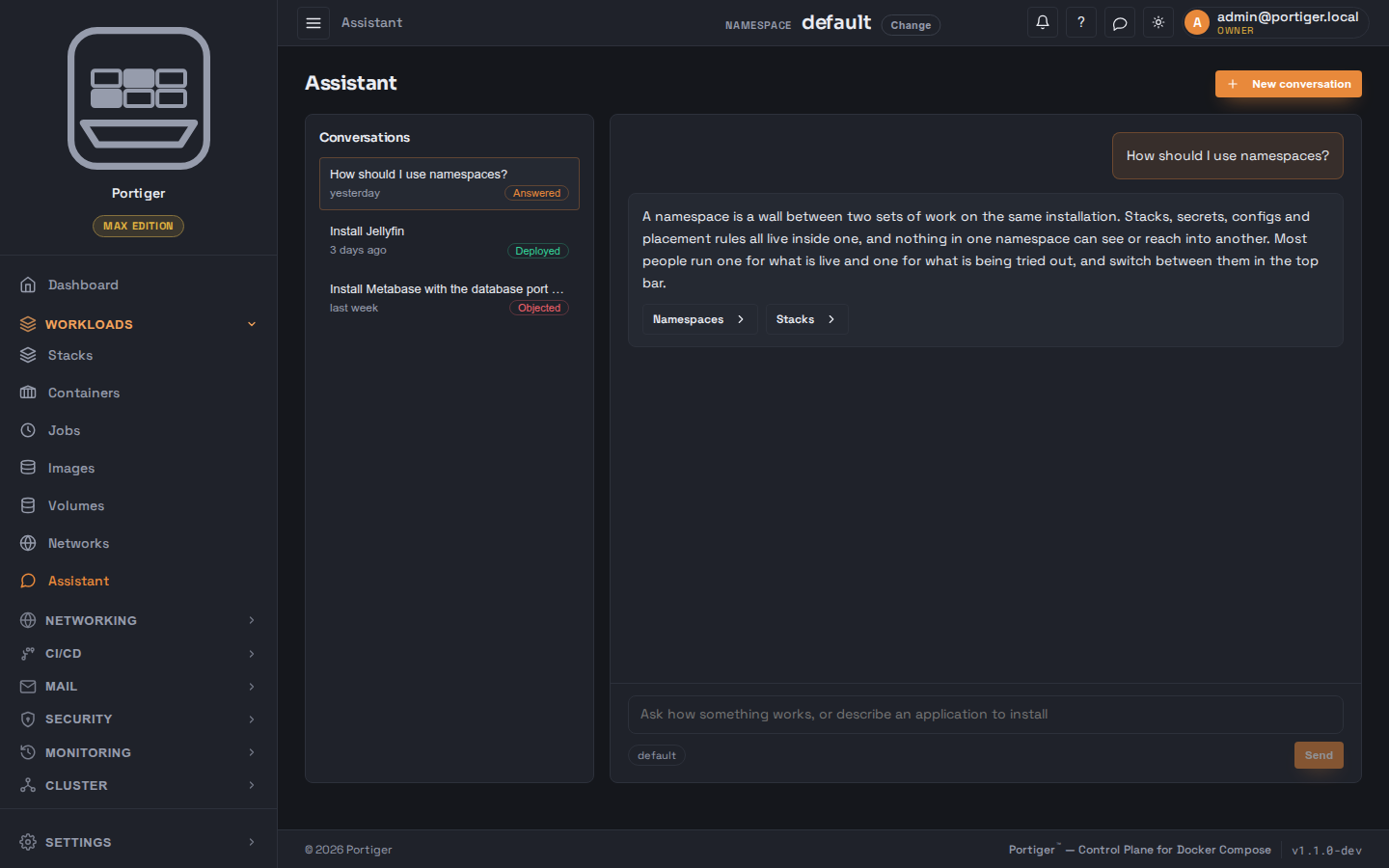
The Assistant page: earlier conversations listed beside an answer explaining namespaces, and a box asking how something works or describing an application to install.
System

The machinery, named on one screen.

  • Docker Engine, workload pool, publishing, mail stack, Sentinel, Assistant link and the privileged helper on one page.
  • Adopt or import a proxy that is already there.
  • One binary, one SQLite database, and portiger update with a snapshot first.
  • Encrypted backups by hand on every plan, to S3 from Team, scheduled on Max.
panel.example.com
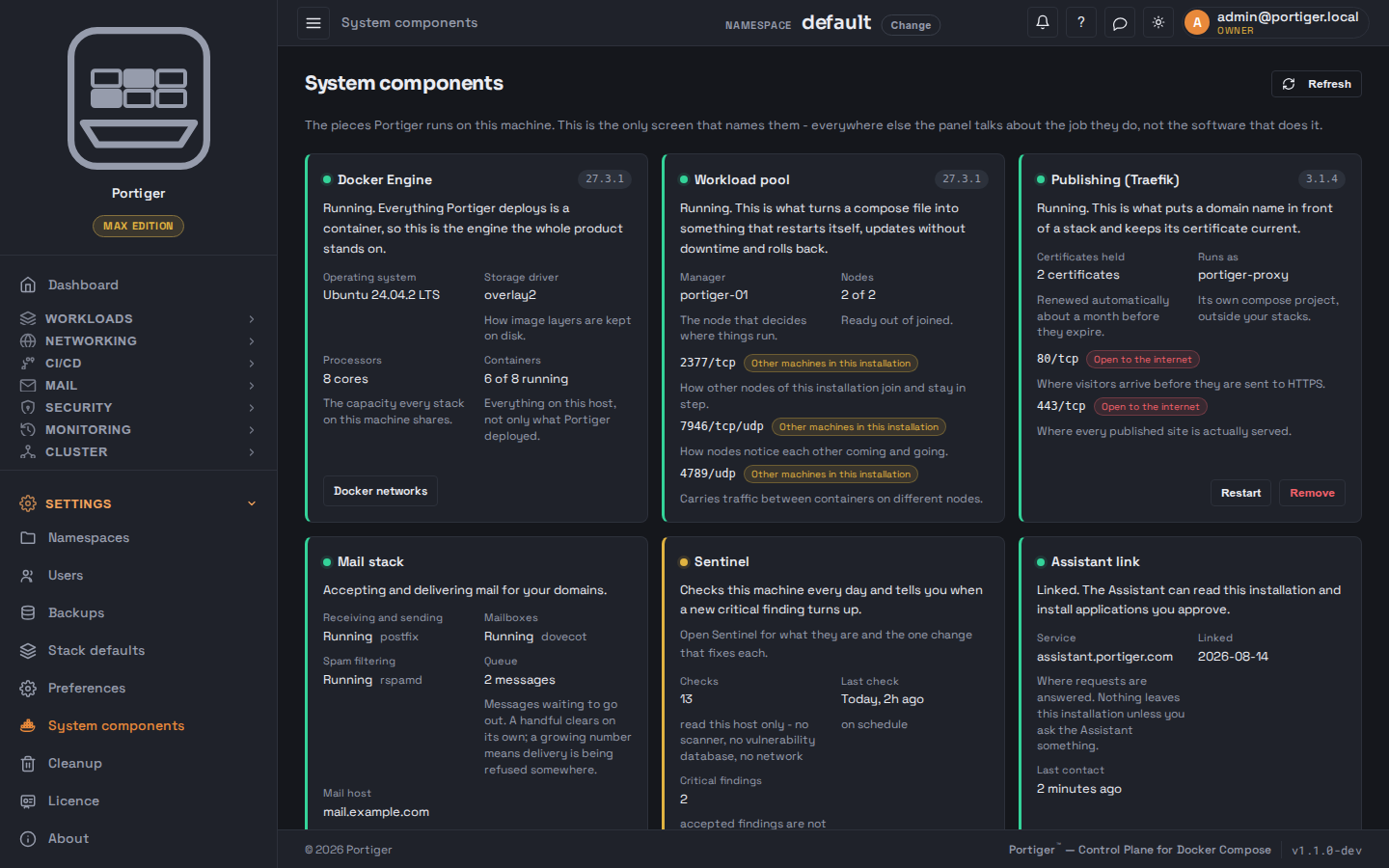
The System components page, listing the Docker engine, the workload pool, publishing through Traefik, the mail stack, Sentinel and the Assistant link, each with its version and whether it is running.
Plans

Which of it is switched on depends on the plan.

Community runs one node for one operator and keeps working forever. What the paid editions add is the mail server, scaling, and — at the top — three nodes behaving as one.

Community

Free

One node, one operator. Unlimited stacks and domains; no scheduled jobs.

Personal

$20/month

Adds the mail server on your own domain, scheduled jobs, and right-sizing that tunes CPU and memory while things run.

Team

$49/month

Five people. Replicas, build pipelines, roles, single sign-on, audit trail and private registries.

Max

$149/month

Twenty-five people. Three nodes as one pool, an mTLS mesh, scheduled backups and the Assistant.